A weaver's words
On a loom, long threads called the warp are stretched tight. The weaver passes another thread, the weft, across them, one row at a time. Nothing in one row is special. But row after row, a picture appears in the cloth.
A computer draws a moving picture in much the same way. Sixty times a second, it builds a fresh image from scratch, in a series of sweeps across the screen. Each sweep adds one thing: the shape of the land, then the shadows, the sea, the clouds, the glow of the light. In graphics these sweeps are called passes. Get enough of them right, in the right order, and you have a world.
So the two pieces of this engine are named for the weaver's trade. Weft is the thread: a tiny toolkit for running passes on the graphics card, through the new WebGPU standard in your browser. Loom is the machine built from it: a renderer that knows how to weave a sky, a sea, weather and film. The games are the cloth.
This page is a tour, layered for different readers. The main text is for anyone curious. The blue boxes go into how the ideas work. The violet ones are for people who write shaders for fun. Open as many as you like, or use the Depth switch at the top to open them all.
Go deeperWhat is a GPU, and why does it need "passes"?+
A CPU is a few very clever workers. A GPU is thousands of simple ones that all run the same small program at the same time, each on its own piece of data: one pixel, one vertex, one cell of a simulation. That small program is a shader.
The catch is that the workers in one sweep can't see each other's results. If you want to blur an image, the blur has to read a finished picture, so the picture must be drawn first, in an earlier sweep. That is why a frame is a sequence of passes, each one reading what the earlier ones wrote, held in images on the GPU called textures and in blocks of memory called buffers.
There are two kinds of pass. A render pass draws triangles into images; the GPU works out which pixels each triangle covers and runs a shader for each. A compute pass just runs a shader over a grid of your choosing, with no triangles at all, for simulations, lookup tables, blurs and anything else.
Thirty-three milliseconds
Here is one frame of Starthread, at golden hour over the harbour town of Lowlight. Your graphics card made it in a few hundredths of a second. It took 55 passes.
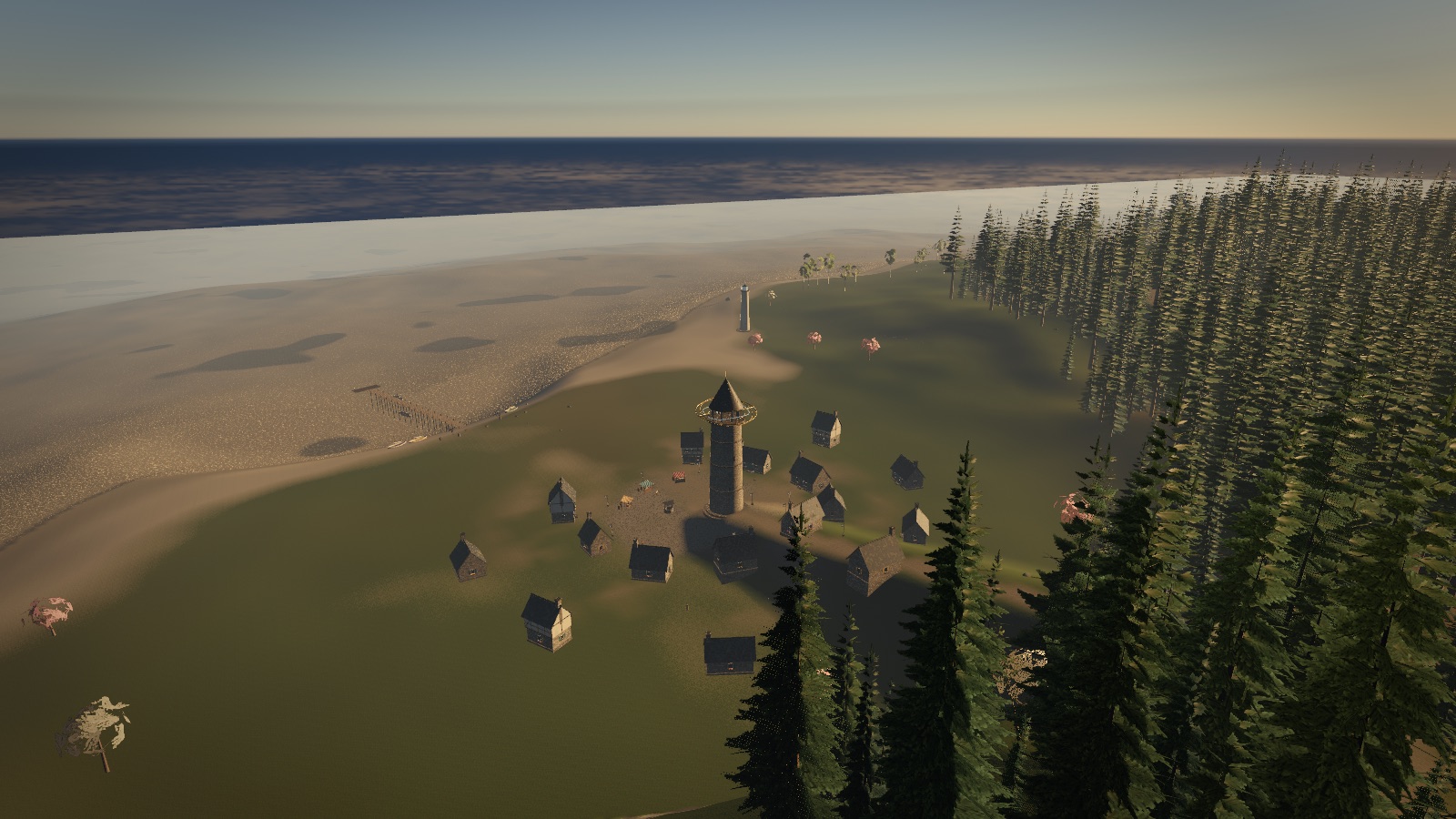
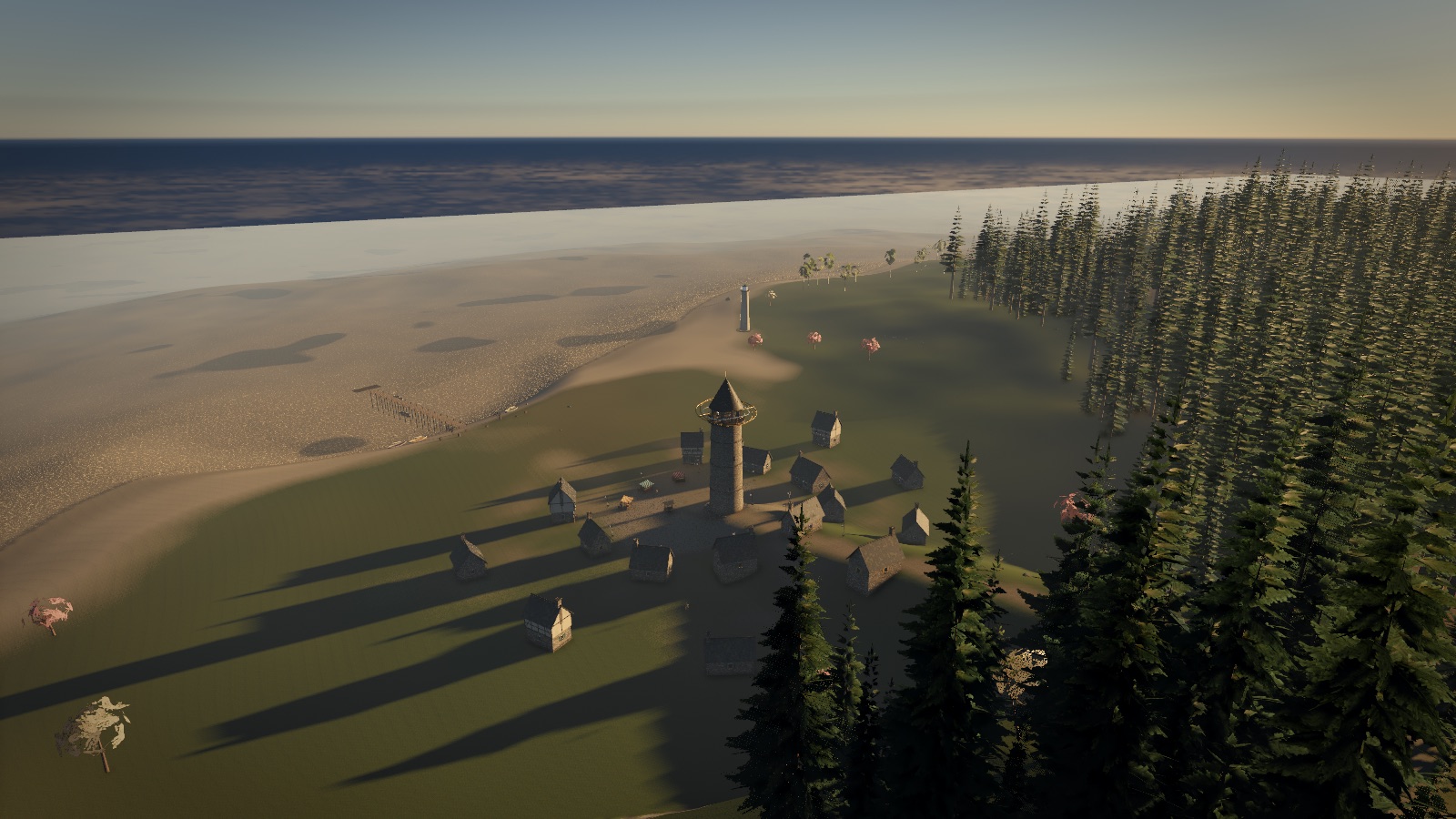
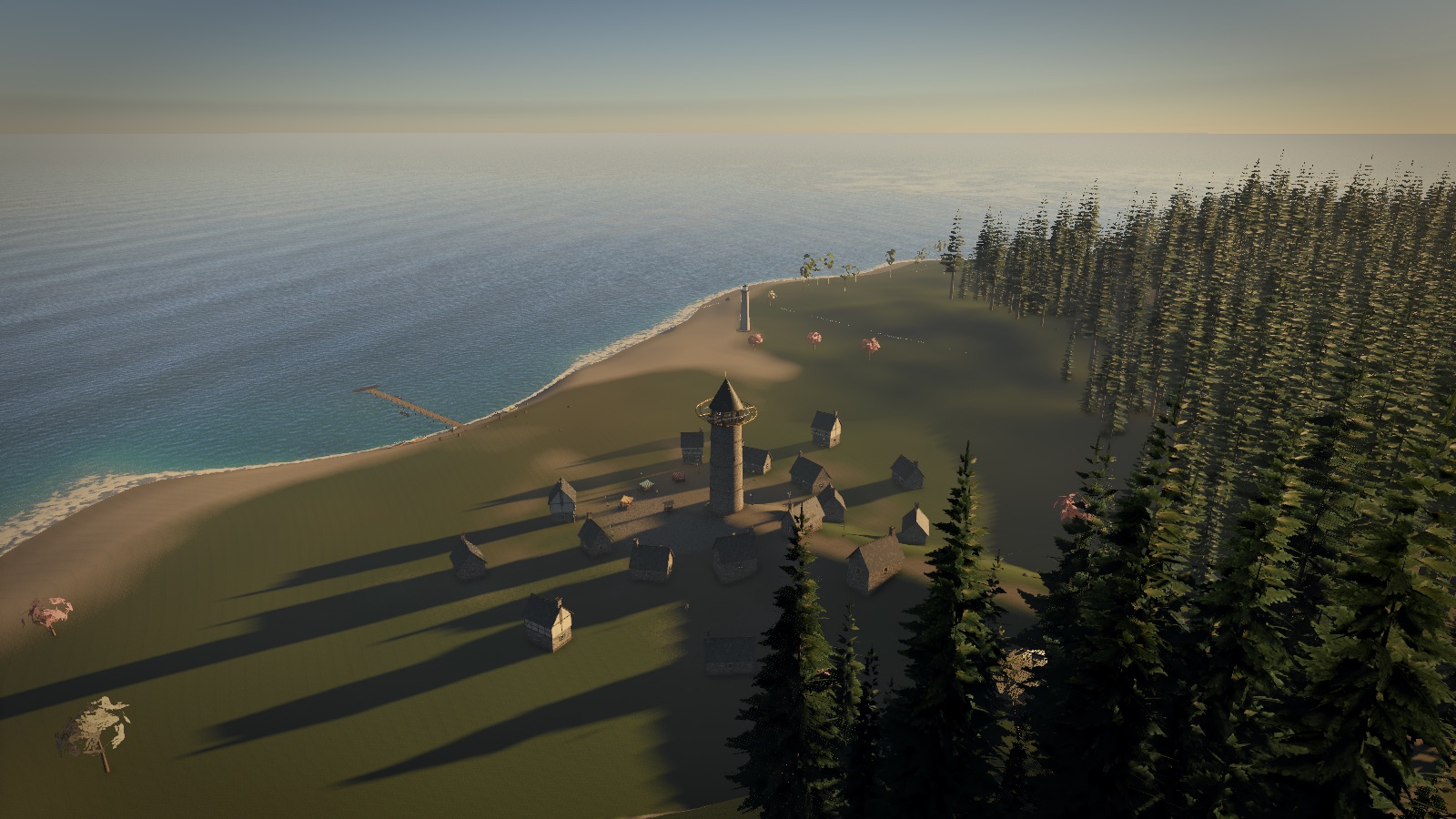
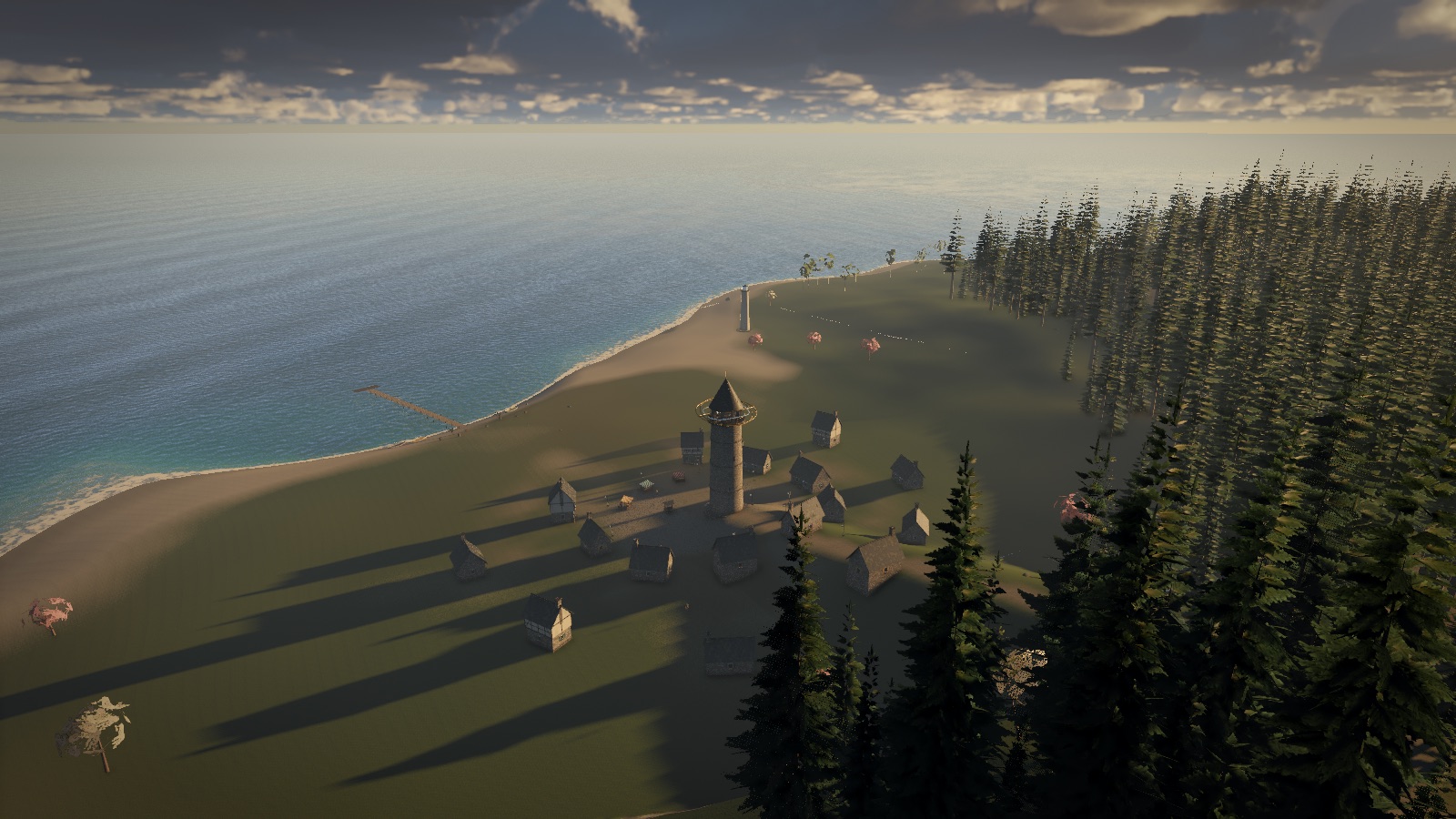
Before a single pixel of the picture is drawn, about twenty compute passes run: they work out the colour of the sky for this exact sun, decide which of the forest's trees are worth drawing, step the ripples on the water, bake the clouds' weather and light. Then the picture is woven, layer by layer. Scroll to watch it come together. These are real captures from the game, with its passes switched on one group at a time.
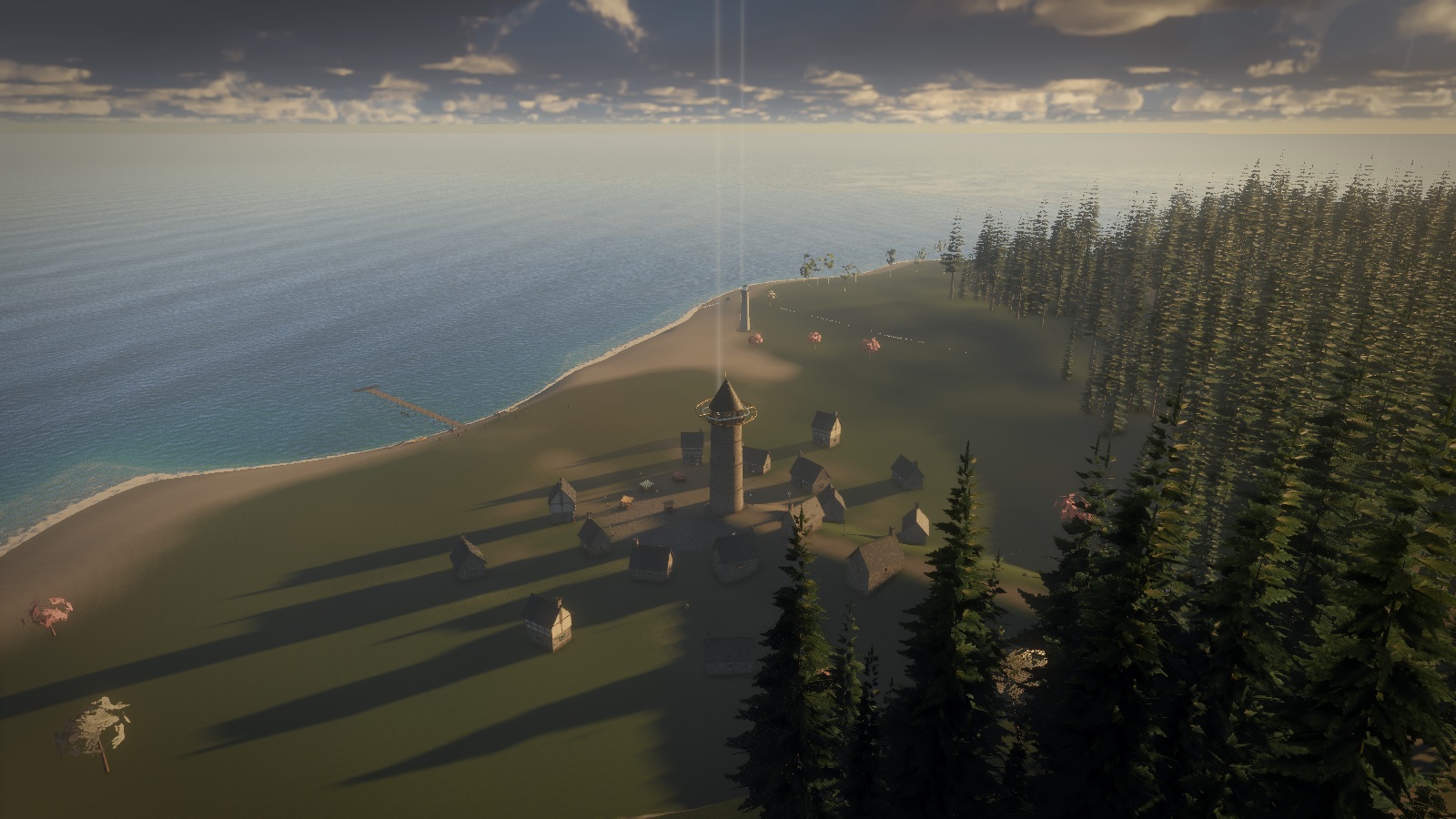
Surfaces, lit by a real sky
The land, the forest and the village are drawn into a high-dynamic-range image: one that can hold the sun's glare and a shadow's gloom in the same picture without clipping either. Every surface is lit by the sun and the sky, and the light the sky gives depends on where the sun is, worked out minutes ago by a physical model of the atmosphere (chapter four).
Notice what's missing. There are no shadows. And there is no sea at all: that pale stretch is the sandy seabed, waiting for water.
Shadows from three cameras and the land itself
To know what is in shadow, you draw the world again from the sun's point of view and remember how far it could see. Starthread does this three times at three scales (24 m, 90 m and 320 m around you), so nearby shadows are crisp and far ones still exist.
The island also casts its own long evening shadows across itself, from a map of its heights that's rebuilt a strip at a time, a few rows each frame. Then ambient occlusion darkens the creases where light from the sky can't easily reach.
Water is drawn last, looking through what's behind it
The sea goes in after the land, because water has to see what's under it. The engine copies the finished picture, then draws the waves over it, bending that copy as if through moving water and tinting it by how much water the light crossed: turquoise over sand, deep blue over the drop-off.
The sky's reflection comes from a second, mirrored camera, drawn earlier at half resolution.
Clouds are not pictures. They're volumes.
Every cloud is a three-dimensional fog of droplets, and each pixel of sky is found by marching a ray through it, adding up the light it scatters. That's far too costly to do fully every frame, so the engine does a fraction of the work each frame and blends it with what it found before. Eight passes go into it. Chapter five is all about them.
Then it becomes a photograph
Low mist settles over the water. Glows are added: the beam rising from the Loom. Then the picture is developed like film. Bright light bleeds into a soft bloom, the exposure adapts the way your eye does, and a filmic curve turns the scene's real brightness into colours a screen can show.
That's the frame. Then it's thrown away, and the next one begins.
Go deeperThe whole frame, as the code writes it+
Loom's renderer builds its frame as one plain list. This is the comment at the top of loom/render/renderer.ts, and the list itself is just an array handed to kit.run() each frame:
// compute: atmosphere, the terrain's shadow (a band a frame), the clouds' bakes, the ripple sim, sims
//   shadow cascades → the planar reflection (half res, a mirrored view) → the MSAA opaque scene → depth resolve
//   → AO (half res, into the scene) → a copy of the scene → the water (refracting that copy, reflecting the mirror)
//   → the clouds (march, resolve, composite) → mist + shafts → glows and particles → underwater → motion blur
//   → bloom (down, eye adaptation, up) → the film grade to the screen
A few details carry most of the craft:
- MSAA ×4 on the opaque scene smooths edges, then a depth resolve keeps the farthest of each pixel's four depth samples so the water behind an edge isn't eaten.
- Reversed-Z depth (1 at the near plane, 0 far away) spreads floating-point precision evenly over distance, so a 5 km view has no z-fighting.
- Half and quarter resolution for things that are soft anyway (AO, reflection, mist, clouds, light shafts), then upsampled with care at edges.
- Forests are culled on the GPU: a compute pass tests every tree against the view and writes the survivors into an indirect draw, so the CPU never touches them. Far trees thin out one by one.
Deep diveHow the frame stays fast: half-res composites, histories and bands+
Three patterns repeat all through loom:
Amortise across frames. Work whose result changes slowly is spread out. The terrain's heightfield shadow is rebuilt a band of rows per frame into one texture while the scene samples the other, and they swap when a pass completes. The light direction is captured at the start of each pass, so one map is always self-consistent. The clouds' weather map and their shadow map work the same way.
Trace sparse, resolve temporally. The clouds trace a quarter of their half-res pixels each frame (in Smooth mode), and a temporal resolve reprojects last frame's result to where it is now, clamps it against this frame's neighbourhood, and blends. The stable image you see is an average over many frames of noisy, cheap samples.
Depth-aware upsampling. Anything traced at low resolution is composited back with a bilateral-style filter: the low-res neighbours whose depth matches the full-res pixel get the weight, so a cloud never smears onto the edge of a tower in front of it.
The frame cost in this capture: 15.9 ms of GPU time at 1600×900 on an Apple M5 laptop, with the Epic preset (clouds traced at every half-res pixel each frame), capped to 30 fps.
Two ways to describe a world
There's a wonderful library for 3D on the web called three.js. Most 3D you've seen in a browser was probably made with it. So why build something else? The honest answer is not that one is better. They begin from different questions.
three.js asks: what is in your world? You describe a scene graph, a tree of objects. A mesh has a geometry and a material. A light hangs in the tree. A camera looks at it. Then you hand the whole tree to a renderer, and the renderer works out the passes for you: what to draw, in what order, with which shaders, how to do the shadows.
Weft asks: what does your frame do? There's no tree of objects. You write the list of passes yourself, and each one says exactly which images and buffers it reads and writes. What you list is what runs, in that order. Nothing else happens.
Neither is free. A scene graph means you get on with your world: load a model, add a light, it works. The price is that the frame belongs to the renderer. When you want to do something it didn't plan for, you work around it, through hooks, custom passes and extension points. three.js is very good at offering those, and it has been growing towards explicit GPU work too: its newer WebGPU renderer has compute and a node-based shading language (TSL) for writing custom passes.
An explicit frame means you do more yourself. There is no material system, no model loader, no shadow you didn't write. The reward is that nothing is hidden. For games built around unusual light, like clouds you fly through, rain lit by headlamps, a sea you can see into, the frame is the work, and it pays to own it outright.
What owning the frame gives you
Every pass has a price tag
The debug overlay lists every pass that ran, each with a switch. Turn one off and the frame time tells you exactly what it cost. No guessing what the renderer did.
Compute is a first-class citizen
A simulation, a lookup table and a blur are passes like any other, in the same list as the drawing, reading the same textures by name.
Time is under your control
Clouds, AO and motion blur need last frame's images. Ping-pong pairs and history buffers are ordinary resources you swap yourself.
The shader is the truth
Data layouts come from the WGSL itself, checked by TypeScript. There's no second description to fall out of sync (chapter three).
What it costs you
WebGPU only
No WebGL fallback. Recent Chrome, Edge and Safari have WebGPU; older browsers and some devices don't. three.js can fall back.
No batteries
No glTF loader, no PBR materials, no editor. These games build their worlds in code: procedural terrain, trees, towns, cars.
You write the shaders
Every surface is WGSL you wrote. That's the point, and also a lot of WGSL.
A tiny community
three.js has fifteen years, thousands of examples and answers for everything. Weft has this page.
So which should you use?
For most projects, three.js (or Babylon.js, or PlayCanvas), and that's said without irony. For a product viewer, a portfolio, an interactive story, most games: start there. Reach for something like weft when the frame itself is your subject, or you want to learn what a renderer actually does. Try it:
Go deeperRetained versus immediate, and what "no hidden scheduling" means+
A scene graph is a retained model: you build a structure once, mutate it, and the library decides each frame how to turn it into GPU work. It can sort objects to save state changes, batch them, cull them, and pick shader variants for the lights in view. That's a lot of clever work you don't have to do.
Weft is closer to immediate: each frame you call kit.run([...]) with the passes to encode. Passes, pipelines and bind groups are created up front and cached, so the per-frame call is cheap, but the order and membership of the frame is whatever your array says. A pass can be in the list conditionally (this.hfOn ? this.hf.items() : []), which is how loom's switches work.
This idea isn't new. Game engines call it a frame graph or render graph: Frostbite's FrameGraph talk (2017) made it popular, and it's how most modern engines organise their renderers. Weft's version is deliberately the simplest one: an ordered list, with no automatic reordering or memory aliasing. You see exactly what you wrote.
Deep diveWhere three.js's WebGPU path and weft actually differ+
Modern three.js (the WebGPURenderer) and weft overlap more than people expect: both run on WebGPU, both do compute, both can build post-processing chains. The real differences are about where the source of truth lives:
- Shading language. three.js's TSL is a node graph written in JavaScript that compiles to WGSL or GLSL, so one material can target both backends. Weft is WGSL-first: you write WGSL and the TypeScript types are generated from it. You give up WebGL portability and get the whole of WGSL directly: storage textures, atomics, workgroup memory, overrides.
- Binding model. three.js manages bind groups from materials and uniforms nodes. Weft derives each pipeline's bind group layouts from reflecting the shader itself, keeps only the bindings the chosen entry points actually use, and binds resources by WGSL variable name.
- Frame ownership. three.js's renderer owns the main loop over the scene. Its post chain is explicit, but shadows, lights, transparency sorting and the like are the renderer's. In weft there is nothing between your list and the command encoder.
Size is a side effect, not a goal: weft's whole runtime (including a debug overlay, a 2D sprite painter and a mesh builder) is about 32 KB gzipped. three.js's core is several times that, because it does several times as much.
The shader is the source of truth
Programs on the GPU are written in a language called WGSL. Programs in the browser are written in JavaScript or TypeScript. The two have to agree, to the byte, on how every piece of data is laid out. Getting that wrong is the classic graphics bug: nothing crashes, the picture is just mysteriously wrong.
Most engines describe the data twice, once in the shader and once in the program, and trust you to keep them in step. Weft describes it once. You write a struct in WGSL, and a build step reads the shader and generates the matching TypeScript. Then your editor knows every field's name and type, and a typo is a red squiggle instead of a black screen.
The layout rules are where people get burned. A vec3f takes 12 bytes but insists on starting at a multiple of 16, so the GPU quietly inserts padding. Build a struct and watch:
Bindings work the same way. A shader declares the resources it needs, like var<uniform> sim: Sim or var prev: array<Cell>, and in TypeScript you hand them over by those names: bind: {'{'} sim, prev: state.read {'}'}. Misspell one and weft tells you which shader, which name, and what it expected.
Here's the smallest complete weft program: a ripple tank simulated in a compute pass, drawn as a lit surface, with a sky and a film curve. It's running live, from the same npm package the games use. Click the water.
Read the last line: kit.run([step, state.swap, step, state.swap, scene, out]). That's the whole frame: simulate, swap, simulate, swap, draw, develop. Every game here ends each frame with a line like it, just longer.
Two smaller ideas make weft pleasant to work in. Pipelines compile up front: await kit.ready() waits for every shader, so a game never stutters the first time a new effect appears. And shaders reload without losing state: edit a .wgsl file while a game runs, and only the pipelines made from it are rebuilt. The ripples keep rippling, the plane keeps flying, and you see the change in under a second.
Go deeperWhat the Vite plugin does to a .wgsl file+
- Includes.
#include "weft/frame"or"loom/env"is resolved, each file once, and every output line remembers which file and line it came from, so a compile error points at the real source rather than a 3,000-line concatenation. - Reflection. The combined code is parsed to find struct layouts (offsets, sizes, array strides), bindings by name, entry points and which resources each one actually touches, compute workgroup sizes, and
overrideconstants. - Declarations. A
thing.d.wgsl.tsis written besidething.wgsl, soimport shader from './thing.wgsl'gives typed structs and binding names (TypeScript'sallowArbitraryExtensions). - Tweaks. A trailing comment like
exposure: f32, // @range(0, 4)becomes a slider in the debug overlay. - Hot reload. Each shader module accepts its own updates. The runtime keeps one canonical object per shader and swaps its code in place, so every pass holding it sees the new version.
struct Sim {
  size: u32,
  damping: f32,     // @range(0.9, 1)
  speed: f32,       // @range(0, 0.5)
  dropRadius: f32,
  drop: vec4f,
}
@group(1) @binding(0) var<uniform> sim: Sim;
@group(1) @binding(1) var<storage, read> prev: array<vec2f>;
@group(1) @binding(2) var<storage, read_write> next: array<vec2f>;
Deep diveBind groups keyed by version, layouts derived per entry point+
Resources have identities and versions. Every texture and buffer has a uid and a version that bumps when it's recreated (a resize, a buffer that grew). A bind group is cached under the (uid, version) of everything in it. A resize therefore just produces a new key and a fresh bind group, and nothing can ever bind a destroyed texture. A ping-pong swap also just changes which key a pass sees, so both bind groups stay cached.
Layouts come from the shader and the resource. The binder derives bind group layouts from reflection, then refines them with the actual resource. An r32float texture binds as unfilterable, a depth texture as depth. Only bindings the chosen entry points use go into the layout, so commenting out a use in WGSL never breaks the bind. Passing a name the shader doesn't declare at all is a loud error.
Group 0 is the frame. Every pipeline shares group 0: a Frame uniform (view/projection matrices and their inverses, last frame's view-projection for reprojection, time, resolution, jitter, a per-view user vec4), the app's globals, and four samplers. A View is a camera with its own Frame, so a shadow cascade or the sea's mirror is just another view. Groups 1 and up can be shared: loom's whole environment (atmosphere LUTs, shadow cascades, terrain maps, ripples) is one shared group 1 that every surface shader includes and gets without passing anything.
Variants are overrides. Instead of a preprocessor making shader permutations, weft uses WGSL override constants: the same module, specialised at pipeline creation. All pipelines are created asynchronously the moment a pass is declared.
Holding the frame
A game feels smooth when every frame arrives on time, more than when it's fast on average. Loom's games offer two presets. Epic renders a steady 30 frames a second at full detail. Smooth renders 60, and lets the resolution give first. Underneath both, weft can watch the GPU's own timer and nudge the render resolution to stay inside a budget. Throw a heavy scene at it:
Deep diveWhy GPU timings lie on a phone-style GPU+
Apple's GPUs, like most mobile ones, are tile-based deferred renderers. Rather than drawing triangles straight into the full-size image, they bin geometry into small tiles and shade one tile at a time in fast on-chip memory. Different passes' work can overlap and be reordered within the GPU's own schedule.
So a timestamp written "between" two passes doesn't measure the first pass's cost the way it would on a desktop GPU. Weft uses the total frame's GPU time for auto resolution (that number is honest), and for pricing individual passes the debug overlay offers ablation: switch a pass off and watch the frame time. Crude, but true.
Why the sky is blue, in code
Loom's sky isn't painted. It's computed from the physics of sunlight passing through air. That's why every hour of the day, every sunset and every blue hour in these games comes out right without anyone choosing its colours.
Sunlight is all colours together. Air molecules are tiny, and they scatter short wavelengths far more than long ones: blue about five times more than red. So the light that reaches you from every direction except the sun's is mostly blue, scattered towards you by the sky. When the sun is low, its light crosses so much air that the blue is scattered away before it arrives, leaving the reds and oranges. Bigger particles (dust, haze, droplets) scatter all colours, mostly forwards, which makes the bright glow around the sun.
Go deeperLookup tables: doing the physics once, not per pixel+
The toy above integrates along every ray for every pixel. A game can't afford that, so loom follows Sébastien Hillaire's 2020 approach (A Scalable and Production Ready Sky and Atmosphere Rendering Technique), which bakes the physics into small tables, LUTs, that shaders just look up:
- Transmittance (once): how much light survives a straight path from any height out of the atmosphere, at any angle.
- Multiple scattering (once): light that has bounced around the sky more than once, the reason twilight isn't black.
- Sky view (every frame): the whole sky's colour as seen from the camera, in a lat-long table with extra resolution near the horizon.
- Aerial perspective (every frame): a 3D grid of froxels in front of the camera holding how much haze and in-scattered light lies between you and each distance. Every surface shader looks it up, which is why far hills turn blue.
- The lighting block (every frame): the sun's actual colour where you stand, and the sky's ambient light, written to a buffer every material reads.
Deep diveThe equations behind the slider+
Rayleigh scattering by molecules has coefficient βR(λ) ∝ λ−4. Sea-level values for (680, 550, 440) nm are about (5.8, 13.5, 33.1)×10−6 m−1, falling off with altitude as e−h/8 km. Its phase function is nearly symmetric:
Mie scattering by aerosols is roughly grey, βM ≈ 21×10−6 m−1 with a 1.2 km scale height, and strongly forward, modelled with a Cornette–Shanks or Henyey–Greenstein phase with g ≈ 0.76.
Single-scattered radiance along a view ray is the integral, over each point x on the ray, of the light reaching x from the sun, scattered towards the eye, and attenuated on the way:
The widget does exactly this with 24 steps per view ray and 8 per sun ray, then tone-maps the result. Hillaire's multiple-scattering LUT adds a cheap approximation of all higher orders by assuming the scattered light is isotropic after the first bounce, summing a geometric series: Ψms = L2 / (1 − fms).
Flying through a cloud
In Stormbreak you can fly into a thunderhead, lose the enemy inside it, and come out the other side through the hole you tore. Clouds you can enter can't be painted onto the sky. They have to be real volumes, and drawing them takes three ideas.
1 · Shape from noise
A cloud's shape starts as noise: a smooth, random-looking 3D pattern. Clouds form where the air is wet enough, so the engine keeps only the parts of the noise above a threshold set by coverage. Slide it to grow a sky. Underneath, a weather map drifts across the world deciding where coverage is high, what type of cloud forms, and how storm-like it is.
2 · Light by marching
To find a pixel's colour, the engine sends a ray from your eye into the cloud and walks along it in steps. At each step it asks how dense the cloud is there and how much sunlight reaches that spot, and adds a little light. It also dims everything behind, because a cloud absorbs as well as glows. This is ray marching.
Steps are expensive, so there are never enough. Too few and the cloud shows hard bands, one per step. The trick is to start each pixel's walk at a slightly different random offset. The bands become fine noise, and averaging a few frames makes the noise vanish. Try it:
3 · The silver lining
Water droplets don't scatter light evenly. They throw most of it almost straight ahead. So a cloud between you and the sun glows brightest at its thin edges, the silver lining, while a cloud lit from behind you looks soft and white. How much light goes in each direction is called the phase function. Swing the sun around:
Go deeperCloud types, storm cells, and holes torn by aircraft+
Loom's clouds are built after Andrew Schneider's Nubis system from Guerrilla Games (Horizon Zero Dawn), with a lot of its own:
- The weather map holds four values per point on the map: coverage, cloud type (stratus → cumulus → cumulonimbus), base height and storminess. It evolves and drifts, a band of rows a frame, and fronts sweep across it.
- Each type has a height profile: stratus is a thin flat sheet, cumulus a puffy column with a flat base, cumulonimbus a tower that spreads into an anvil at the top.
- Erosion uses curl-distorted Worley detail: wispy underneath where air is rising, billowy on top.
- Storm cells get their own light boxes so lightning can relight one cloud from inside. The flash is added in the final composite rather than inside the march, so it doesn't lag behind or flicker in a checkerboard.
- A wake map records tunnels torn by things flying through, and they slowly heal. That's Stormbreak's "punch a hole in the storm".
- A cloud shadow map, baked like the weather, darkens the ground, sea and other clouds below.
Deep diveThe flicker hunt: accumulating by sample count, two layers, and YCoCg clipping+
Volumetric clouds that hold still on a screenshot often shimmer in motion, and flying through them at jet speed is the worst case there is. The research notes in the repo trace the flicker to three sources: too few effective samples per pixel, one reprojection depth for things at very different distances, and near-field detail that changes faster than the history can follow.
The noise budget. An exponential moving average with weight α converges to an effective sample count
So α = 0.4 is only about 4 samples, and α = 0.1 about 19. Loom tracks a per-pixel history length n and blends with α = max(1/(n+1), αmin), as in SVGF. A fresh pixel converges fast, then settles into a long average; a disocclusion or a big reprojection error cuts n back.
Two layers. Near cloud (out to a split that grows with flight speed) is traced at every march texel every frame on a lattice fixed in world space, with a short history. Far cloud is traced a quarter of its half-res pixels per frame in a four-frame cycle, on a deterministic step lattice, with a long history. Each reprojects with its own depth, and confidence falls with the depth spread times the camera's motion.
Clipping. Before history is blended, it's clipped to the box of colours seen in this frame's 3×3 neighbourhood, measured in tonemapped YCoCg space with tent-weighted statistics. That rejects stale history without letting single noisy samples pull the box wide.
Pre-filtered noise. Each sample's detail noise is blurred according to how far its point moves between updates, so fast-moving near wisps don't alias into sparkle.
Light. Instead of a cone of shadow taps per step, a 3D light volume stores optical depth towards the sun and straight up, a slice band per frame, so lighting a sample costs one fetch, plus two short taps for the billows' own self-shadowing. Scattering uses Wrenninge's multiple-scattering octaves (each octave with less extinction and a flatter phase), with Hillaire's energy-conserving step integration:
A sea you can see into
Real waves don't move water across the ocean. Each bit of water goes round in a circle, and the shape of the wave travels on. Sum a dozen of those circles at different sizes and directions, and you get a sea.
This is a Gerstner wave. Because the points move sideways as well as up and down, they bunch together at the crests and spread out in the troughs: sharp peaks, flat valleys, the shape of real water. Turn up the steepness until the crests nearly fold over.
The colour of the sea is just as physical. Water absorbs red light within a few metres, green over tens, and blue last. Over pale sand in the shallows you see the light that survived the round trip: turquoise. Over deep water there's no sand to bounce back from, and you see the blue that water scatters itself. Loom tints whatever it sees through the sea by the thickness of water crossed, colour by colour.
Go deeperWakes, ripples, mirrors and the view from underwater+
- The sea is a radial grid that follows the camera out to the horizon: dense near you, coarse far away, so there are triangles where the waves need them.
- Near the player, a ripple simulation runs on the GPU: the wave equation on a height grid that slides with you. Wading legs, swimming strokes, the buggy's wheels and splashes all push it. It's stored toroidally: a cell of the world always lands in the same texel, so when the window slides, no data moves; only the cells coming into view are reset. (The live demo in chapter three is the same equation.)
- The reflection is a second camera mirrored under the sea, rendered at half resolution before the main scene, with a clip plane so nothing under the water shows up in it.
- Under the sea, a caustic pattern is baked each frame and projected down along the refracted sunlight, sun shafts are marched at half resolution, and there's a slow refraction wobble. When the lens straddles the surface you get a waterline, and after surfacing, drops run down the lens.
Deep diveThe Gerstner equations, and why they're calmed in the shallows+
For a wave with direction D, wavenumber k = 2π/λ, amplitude A, steepness Q and speed from the deep-water dispersion relation ω = √(g·k), a surface point that rests at x0 is displaced to
The horizontal term is what pinches the crests. If the sum of Qi across waves exceeds 1, the surface folds through itself, so steepness is budgeted across the dozen waves. Their directions are spread around the wind, and wavelengths are spread over an octave or two so no pattern repeats visibly.
In the shallows the amplitude is reduced by the water's depth, read from the terrain height map, so the waves calm over sandbars and don't poke through the beach. The normal for shading comes from the analytic derivatives of the same sum, plus the ripple sim's gradient near the player.
Lamplight in the rain
Rainline is a night race in a thunderstorm, and most of its picture is light you can't normally see: headlamp beams and lamplight made visible by the rain and mist they pass through.
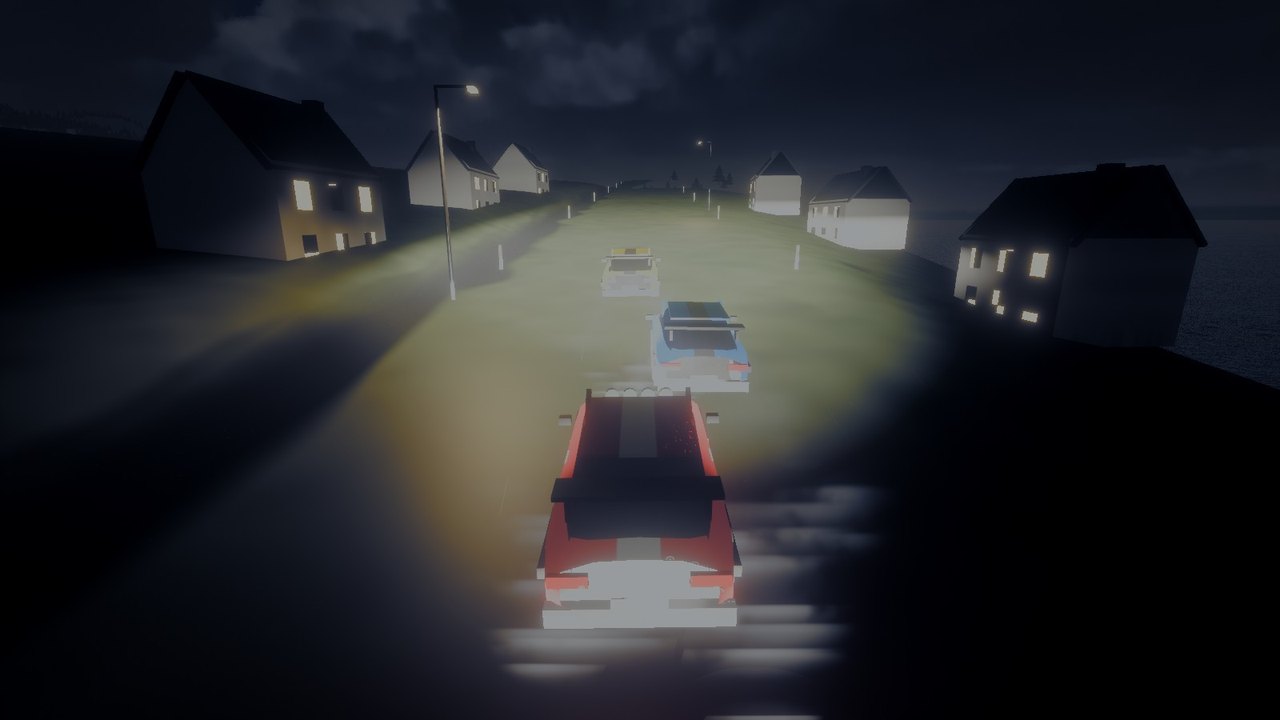
To draw a beam, the engine walks along each pixel's view ray and asks, at a few points, how much lamplight is there to be scattered towards you. But lamplight is very uneven. It's blinding next to the bulb and nearly nothing a few metres off, and with only a handful of samples, where you put them decides everything.
The rain itself is a lovely cheat: nothing is simulated. Every raindrop's position is a formula of its number and the time, falling through a box that wraps around the camera. It costs only the drawing. Drops are stretched along their motion relative to the camera, so driving into the rain draws them into streaks, and each splash is placed by picking a random spot on the screen and asking the depth buffer what surface is there: road, roof or bonnet.
Deep diveEqui-angular sampling, in four lines+
For a ray o + t·d and a point light at p, let Δ be the distance along the ray to the point closest to the light, and D the light's distance from the ray. The in-scattered radiance falls as 1/(D² + (t − Δ)²). Choosing t so that the angle θ is uniform, with the pdf proportional to that same falloff, cancels the inverse square out of the estimator:
const thA = Math.atan((a - delta) / D), thB = Math.atan((b - delta) / D);
const theta = thA + u * (thB - thA);           // u uniform in [0, 1)
const t = delta + D * Math.tan(theta);
const pdf = D / ((thB - thA) * (D * D + (t - delta) ** 2));
Loom does this per lamp, only over the stretch of each ray inside the lamp's reach and cone, at half resolution, with a two-lobe phase for rain (the drops' forward spike plus mist) and the air's own extinction. Then a depth-aware 4×4 composite brings it to full resolution.
Developing the picture
Inside the engine, light has its real range. The sun's disc is tens of thousands of times brighter than a shadow under the trees. A screen can show maybe a thousand to one. Squeezing one into the other is called tone mapping, and it decides more of a game's look than almost anything else.
Chop the bright values off and the sky clips to a flat white slab. Squash them evenly and everything goes grey. Film did something cleverer: highlights roll off gently and lose their colour as they brighten, the way a real photo of a sunset fades to white at the sun. Loom uses AgX, a modern curve designed to behave like that.
Go deeperBloom, eye adaptation and the rest of the darkroom+
- Bloom imitates light scattering in a lens and in your eye. The image is shrunk six times with a careful 13-tap filter, then grown back with a tent filter, adding each level in. The result is a wide, soft glow that keeps its energy rather than just brightening the picture.
- Eye adaptation builds a histogram of the frame's brightness on the GPU, ignores the brightest few percent so a single sun doesn't plunge the picture into darkness, and eases the exposure towards its target, faster when getting darker than lighter, like your eyes.
- Scotopic vision: at night, colour drains and shifts blue, as your eye's rods take over from its cones.
- The grade: split toning (warm highlights, cool shadows), hue-selective tweaks, vignette, film grain and a dither so gradients in the sky never band.
- Smithereens adds a lens: red halation around highlights (film stock's tell), chromatic fringes and barrel distortion towards the corners, and a tilt-shift depth of field that makes a city look like a model.
Paint, ink and painter's shadows
Not every world should look like a photograph. Fauve is named after the painters who used colour wildly, and loom has a second set of tools for it.
Toon light blocks light the way a painter does instead of shading it smoothly: a lit side in the light's own warm colour, a shadow side in a cool complementary colour, never grey. A white wall's shadow is violet, a yellow wall's is orange-brown, a magenta one's purple. There's a hot line where light meets shade, and a rim of sky colour on edges turned away from you.
Ink lines come from a neat property of depth. In loom's reversed-Z depth buffer, any flat surface on screen has depth that changes in a perfectly straight line from pixel to pixel. So the change of the change, the second difference, is exactly zero on every face, whatever its angle, and spikes at creases and silhouettes. One test finds both kinds of edge.
Go deeperPaint that soaks into the world+
Fauve's paint lives in a 3D grid of voxels laid over the whole level. Each voxel holds how much of each of three paints covers the surface that passes through it, and when it was last painted, because fresh paint is wet and glossy. A splat is a compute pass that stamps a ragged, lobed blob of paint into the grid (or bleach, which takes it away).
Any surface shader can include the paint functions and read the grid at its own position, then threshold it with a little noise for a crisp but organic edge. Because the paint lives in world space rather than on each object's texture, it flows across seams, around corners, from a rock onto the floor.
The gameplay needs to know what's under your feet (magenta bounces, yellow speeds you up, cyan lets you walk up walls). Reading the GPU back every frame would stall, so the CPU keeps its own small mirror of the grid, updated with each splat.
The ink pass also boils: lines wobble a little and are redrawn a few times a second, like a hand-drawn animation, and thin away with distance.
Things built to break
Smithereens is a whole harbour city made to come down: towers 280 m tall, a bridge, a TV tower. Everything that breaks is made of cells (bricks, slabs, beams, panes), each a simple convex shape, held together by bonds where they touch.
When something hits a wall, the impact's energy (half its mass times its speed squared) spreads into the bonds and cells around it. Bonds snap. Cells that take too much shatter into fragments. To make the fragments, scatter some points through the cell and give each point all the space that's closer to it than to any other point. Those regions are Voronoi cells, and they look remarkably like real cracks. Click to break the slab:
Go deeperStatic until hit, and one draw for sixteen thousand pieces+
Simulating every brick of a city all the time is impossible. So a whole standing structure is one static body to the physics engine. Only when part of it loses its path to the ground does that part become a dynamic body of its own, which falls as one piece and breaks again when it lands. A crude load rule brings down a storey that has lost too much of what held it up, toppling the top towards where it was hit.
Physics runs on box3d.js, the WebAssembly build of Erin Catto's box3d, with the solver spread across your CPU's cores when the page is allowed threads. Steps are always a fixed size: slow motion makes them smaller, never skips them, so a slow-mo crash is the real crash, slower.
Drawing is one call. Every piece's triangles live in one big vertex buffer (allocated first-fit, with freed ranges reused), each vertex naming its piece's slot, and each slot holds a transform. Per frame, only the slots that moved are uploaded. Faces made by breaking are flagged, and brick, mortar and windows are drawn procedurally in material space, so the pattern runs on across a fresh break.
Sound without a single recording
There are no audio files in these games. Every splash, footstep, engine, thunderclap, cricket and note of music is synthesised by code when the game loads, in a background thread.
Water is the best example. The sound of water isn't really the water: it's bubbles. A bubble born underwater rings like a tiny bell for a few milliseconds, at a pitch set by its size (Minnaert, 1933). Small bubbles ring high, big ones low. A drip is one bubble; a stream is thousands. Loom builds its water sounds from populations of them.
Go deeperThe rest of the orchestra+
- Sounds are rendered once, then played. At load a Web Worker renders a bank of sounds into memory (pure DSP into float arrays, no Web Audio nodes), with the most needed first. Wildlife calls and music phrases are rendered on demand, a fresh variation every time.
- Crickets chirp at a rate set by the temperature, Dolbear's law, so a warm night is busier than a cold one.
- Reverb uses impulse responses generated in code: frequency-dependent decaying noise with its own decay per band, sparse early reflections, and distinct echoes off valley cliffs.
- Engines: Rainline's four-cylinder is a loop rendered at base revs (firing pitch, intake rasp, exhaust burble), played faster for higher revs, with a snarl layered in under throttle.
- Music is generative. Starthread's score is in D lydian by day and its relative B minor at night: a pad holds each chord, a harp arpeggiates it (more densely while you fly), a celesta answers. Fauve's groove is a 112 bpm toybox band (marimba, a plucked Karplus–Strong bass, kick, snap, shaker) that plays more of itself the more you're doing.
- The mixer's master chain ends in a compressor, a limiter and a soft clipper, so nothing can ever clip, however much explodes at once.
Take the thread
Weft and loom are open source and on npm. These games install them like anyone else would. If you'd like to see how a renderer really works, or build something where the frame is the point, they're yours to read, run and take apart.
# the kit
npm install @ericrius1/weft

# the renderer, if you want it
npm install @ericrius1/loom
// vite.config.ts
import { weft } from '@ericrius1/weft/vite';

export default defineConfig({
  plugins: [weft({ libs: { loom: '@ericrius1/loom' } })],
});
A word on its ancestry: much of loom's look (the atmosphere, the clouds' first generation, the film) was first built for Waterbending, which runs on its own engine, then ported onto weft so the other games could share it.
Further reading
- Sébastien Hillaire, A Scalable and Production Ready Sky and Atmosphere Rendering Technique, EGSR 2020
- Andrew Schneider, The Real-Time Volumetric Cloudscapes of Horizon Zero Dawn, SIGGRAPH 2015, and the Nubis talks after it
- Sébastien Hillaire, Physically Based Sky, Atmosphere and Cloud Rendering in Frostbite, SIGGRAPH 2016
- Magnus Wrenninge, Production Volume Rendering, SIGGRAPH 2017 course (multiple-scattering octaves)
- Christopher Kulla & Marcos Fajardo, Importance Sampling Techniques for Path Tracing in Participating Media, EGSR 2012
- Jorge Jimenez et al., Practical Real-Time Strategies for Accurate Indirect Occlusion (GTAO), SIGGRAPH 2016
- Yuriy O'Donnell, FrameGraph: Extensible Rendering Architecture in Frostbite, GDC 2017
- Christoph Schied et al., Spatiotemporal Variance-Guided Filtering (SVGF), HPG 2017
- Robert Ulichney, The void-and-cluster method for dither array generation, 1993 (blue noise)
- Kees van den Doel, Physically-based models for liquid sounds, ICAD 2004
- Troy Sobotka's AgX, and its many ports
- Erin Catto's box3d, and Isaac Mason's box3d.js
- Brendan Duncan's wgsl_reflect
- And three.js, which taught a generation of us 3D on the web